AI Studio — AI Photo & Video Generator
AI Studio — AI Photo & Video Generator
iOS app design (test assignment)
Role: Product design — research through hi-fi prototypes and design system.
Method: Claude as an AI co-pilot to accelerate research and early iterations. Final UX decisions, product architecture, design system, and UI polish were done by hand.
Context
Modern AI apps don't compete on generation quality — they compete on speed, inspiration, and how frictionlessly you reach your first result. So the core objective was to shorten the path from opening the app to a first successful generation.
Key requirements from the brief:
— a feed of template effects in 9:16 cards, sorted by content type, gender, and curated thematic collections;
— a text-to-video screen with a 720p / 1080p resolution toggle;
— token cost shown directly on the Generate button;
— a paywall with Weekly / Yearly tiers and a persistent Pro indicator.
Monetization: tokens + subscription. Timeline: 2–4 days.
Method: 2 layers
Rather than chase the result in one huge, vague prompt, I split the process into two layers — thinking and making.
Layer 1 — Claude Chat. I produced the research artifacts (competitor analysis, JTBD, user flows, CJMs) and used them to build lo-fi wireframes and explore visual directions.
Layer 2 — Claude Design. With those artifacts and a reference set in hand, I ran two hi-fi iterations; the second built directly on the manually refined output of the first.
Between steps I reviewed the output and adjusted it by hand. At every step the model built on decisions that had already been approved, not on guesses.
Layer 1. Claude Chat — Research and Structure
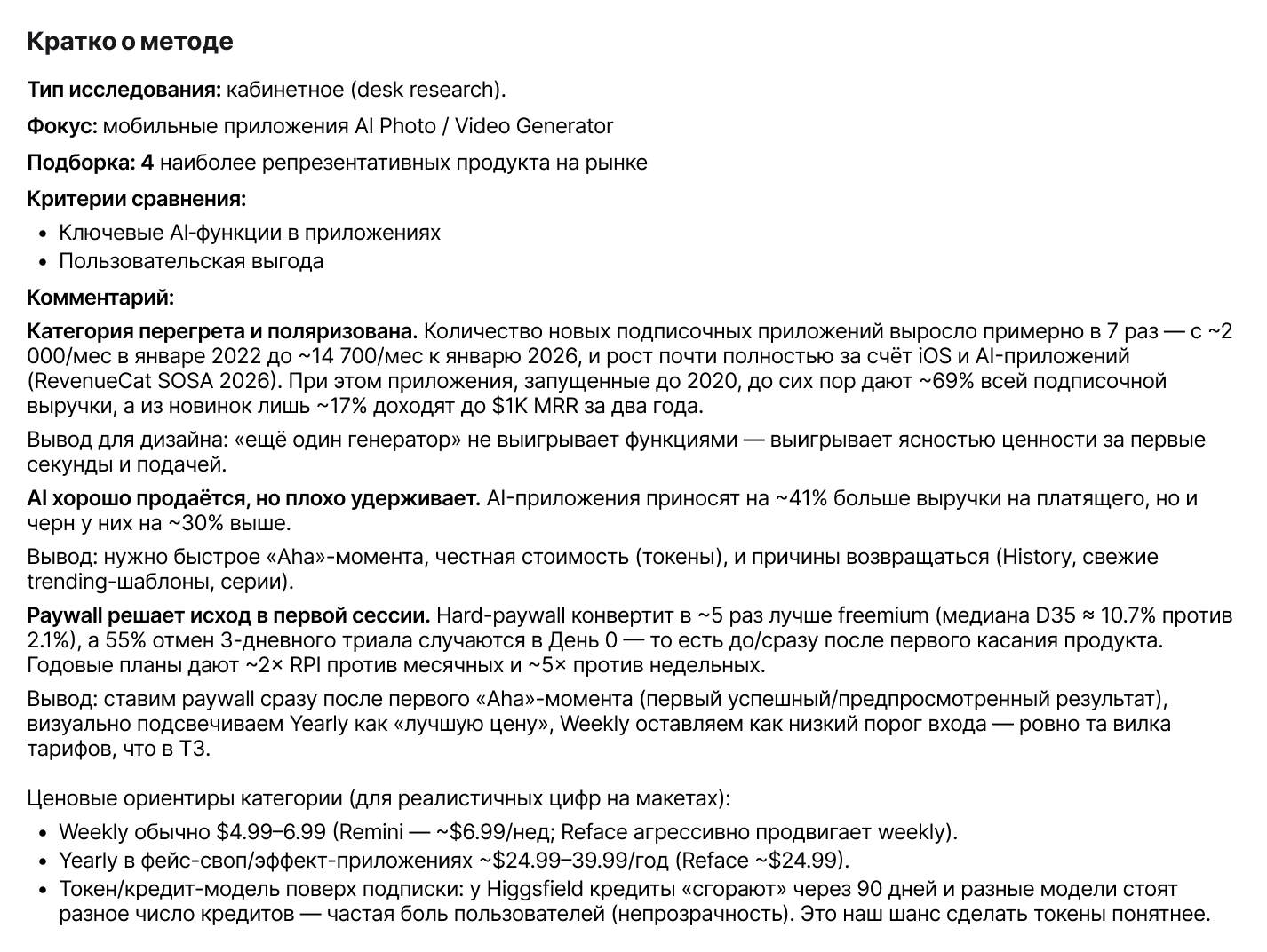
Research: four competitors (Remini, Pixverse, Higgsfield, Reface), plus user flows, JTBD, and a CJM.
Key patterns:
— most apps lead with an inspiration-first feed;
— generation cost is always visible upfront;
— the paywall appears contextually, in response to an action;
— templates remove the cognitive friction of the empty prompt;
— once a template is picked, users can switch to another one quickly;
— generation phases are surfaced to reduce the uncertainty of waiting.
Core JTBD: "When I want to make an engaging AI video fast, I want to pick a ready-made scenario or write a prompt, so I can get a result without complex settings and at a transparent price."
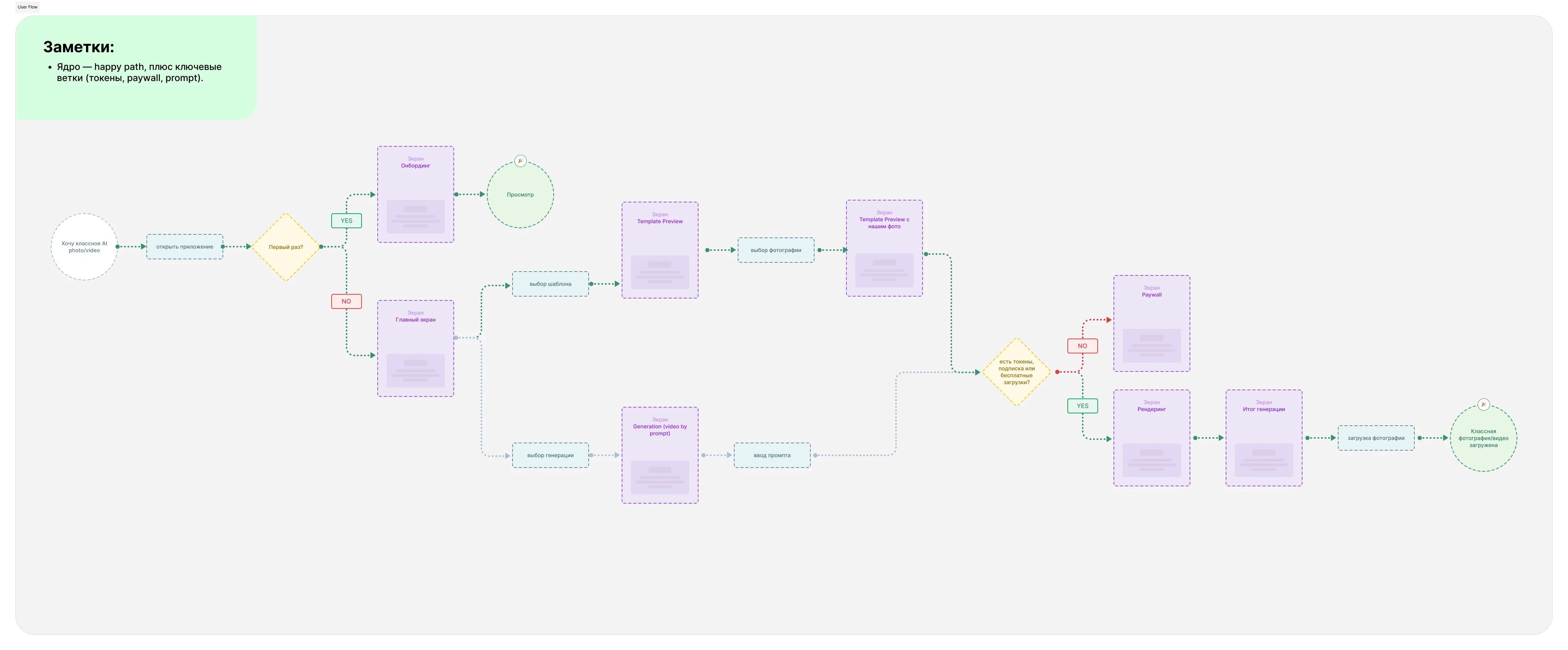
The user flow mapped the happy path and the key branches — paywall entry, prompt-based generation — and became the frame for the next step.
The user flow mapped the happy path and the key branches — paywall entry, prompt-based generation — and became the framework for the next step.
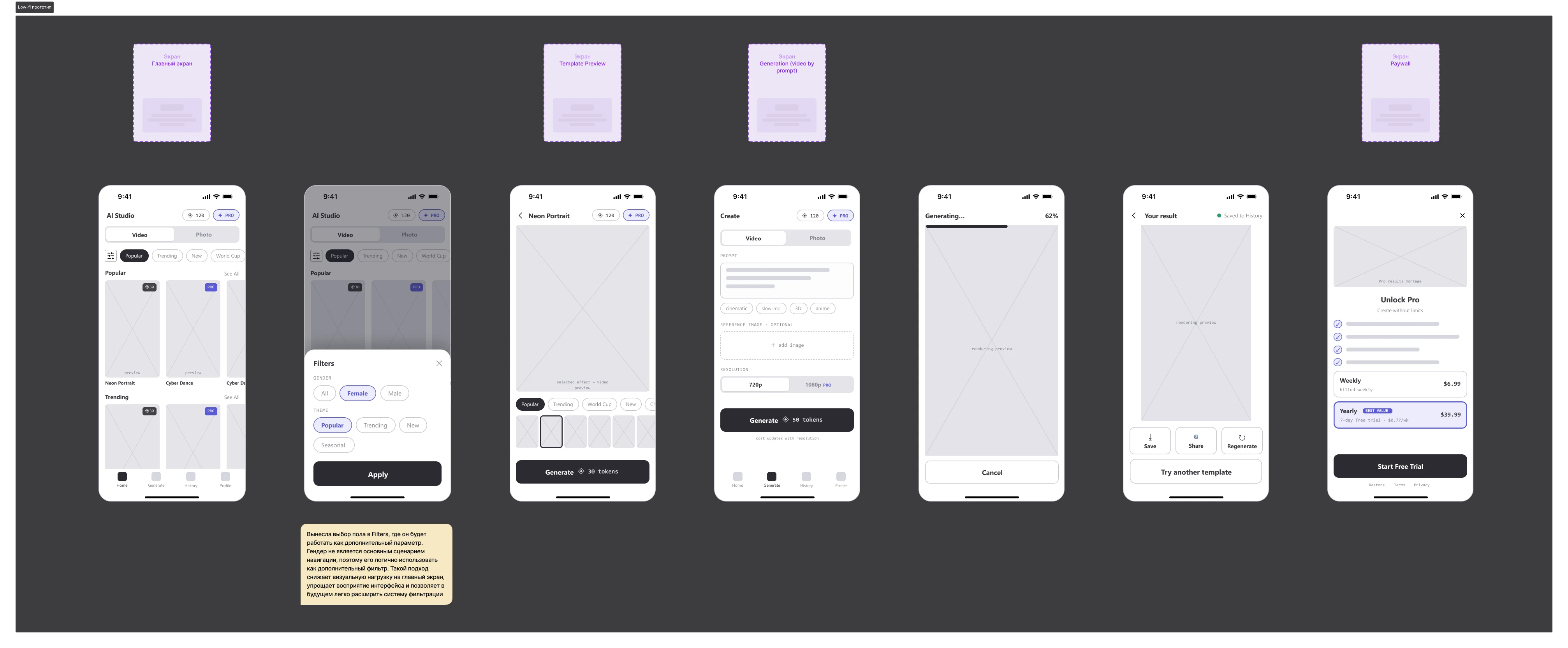
Low-fi prototypes
Claude generated a first low-fi prototype from the research. I kept it and refined it by hand, folding in the insights from the analysis:
— moved the Male/Female selector out of the category chips into a dedicated filter - it belongs to a different axis ("audience," not "curated mood");
— removed the redundancy between chips and feed sections;
— established end-to-end token logic: price stays visible at every touchpoint, so the cost of any template is clear at a glance.
Visual Directions
I generated several visual identities, each with a palette and components, and chose Studio Noir — a dark, cinematic base with a prismatic accent that surfaces only at key moments (Generate, Pro, generation). The dark theme makes AI content pop, adds a premium feel, and keeps the imagery as the focal point of the interface.
Phase one produced more than static mockups: a validated structure and an approved visual language.
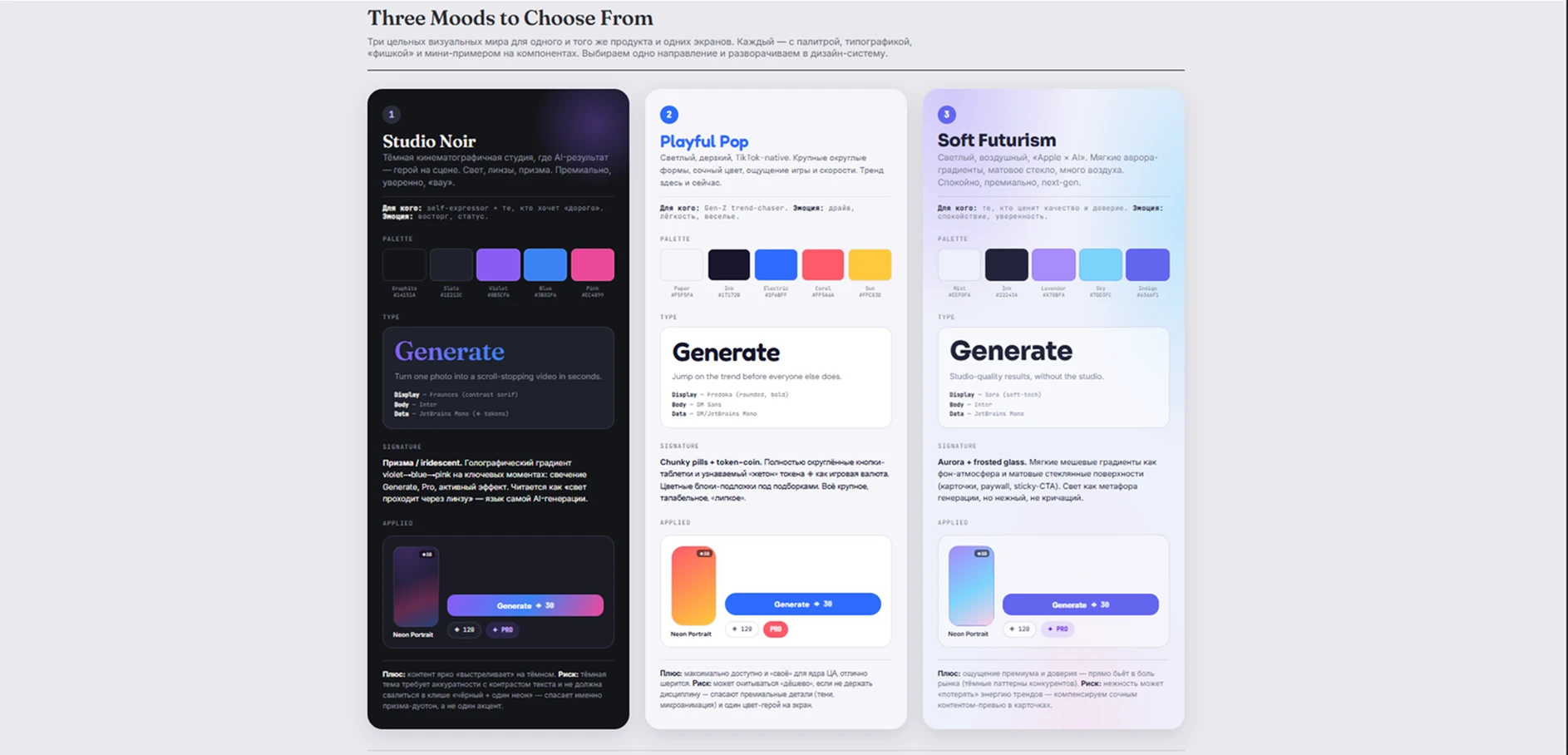
The output of the first phase is not just static mockups, but a validated structure and an approved visual language.
Layer 2. Claude Design — 2 hi-fi iterations
With these artifacts and selected references, I transitioned to Claude Design.
Iteration 1. I generated hi-fi mockups on top of the approved wireframes and the chosen creative direction. The structure was settled, so this was purely the visual layer.
Iteration 2. Revisited the layouts: tightened typography and visual hierarchy, standardized token values, and added the Rendering and Result states.
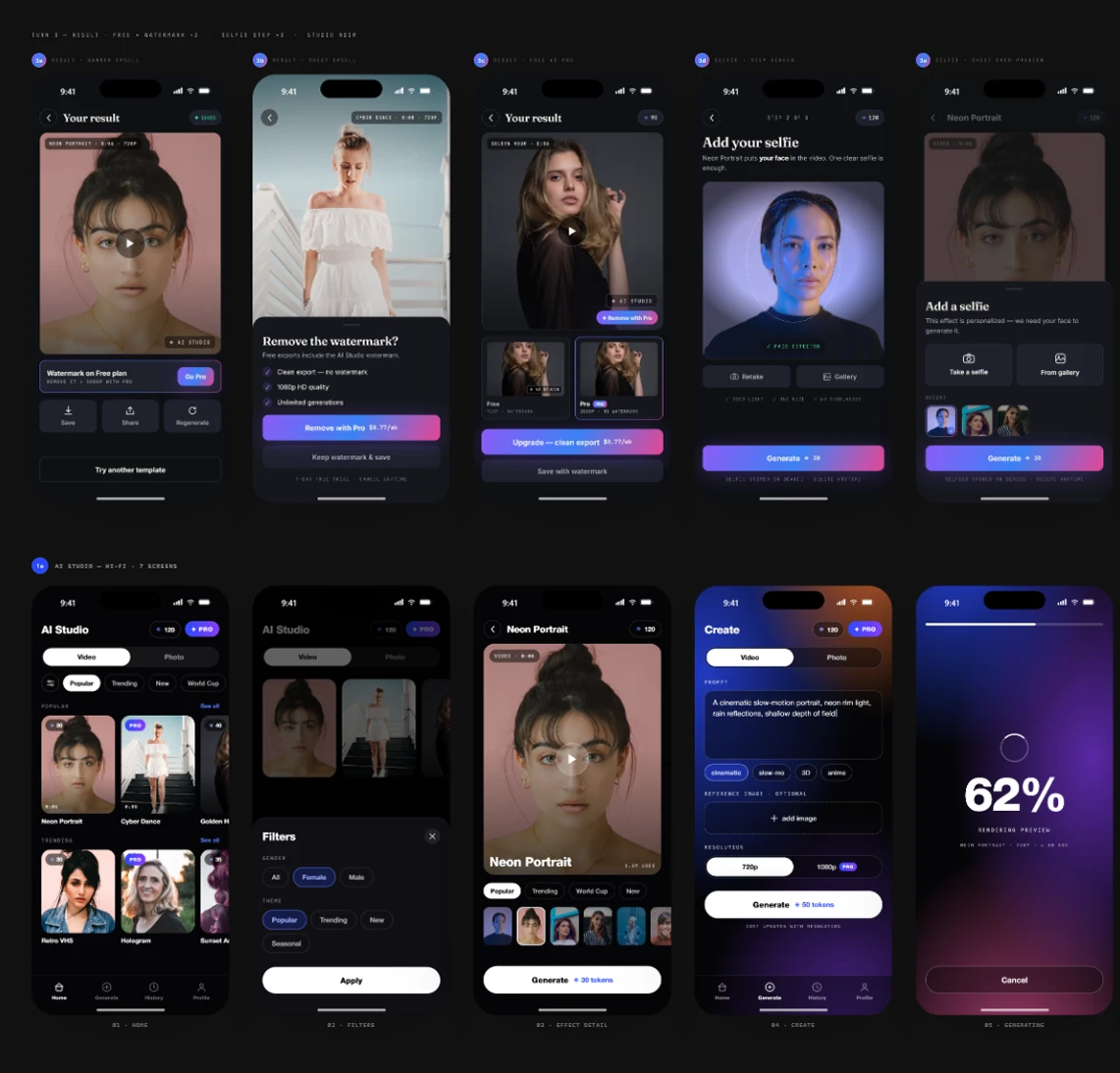
Then I moved everything into Figma, polished it by hand, and built the design system from scratch.
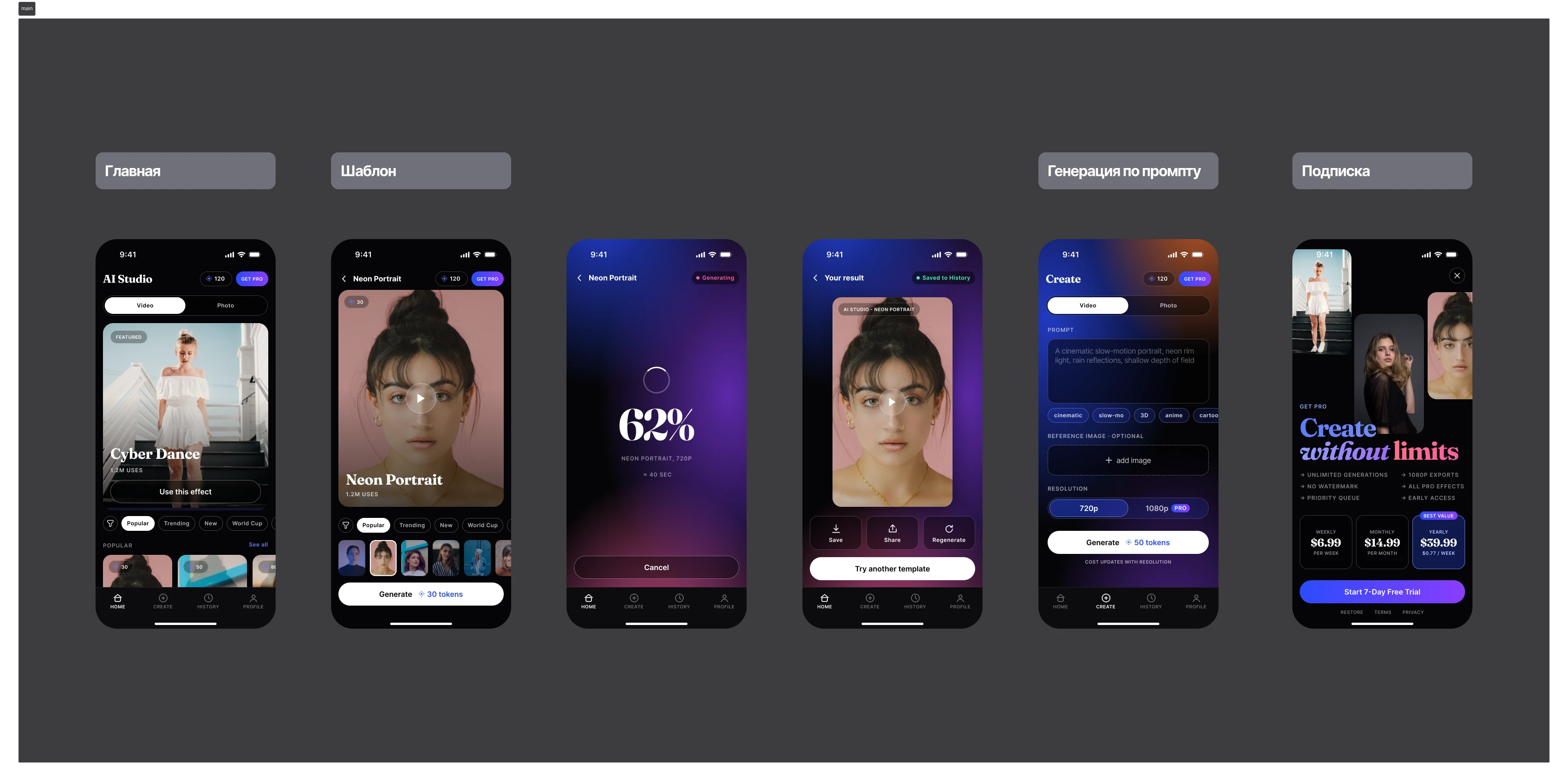

Project link: AI Studio — AI Photo & Video Generator
Open file in Figma
Claude's Role
Claude Chat was the analyst and wireframe generator: research, lo-fi wireframes, visual language exploration. Claude Design was the visual engine, producing two hi-fi iterations on the approved foundation. The decisions, the revisions, and the design system were mine.
This staged workflow — research → refined lo-fi wireframes → chosen visual language → hi-fi design — kept the model from hallucinating: it always built on approved assets. Fewer revision cycles, and the full pipeline, brief to design system, delivered on time.
Conclusion
The power isn't in the generation — it's in how the designer directs it. Claude is at its best when a human sets the constraints, reviews the output critically, and refines it by hand, with the tools split by function: the chat thinks, Claude Design makes.
This AI-native process — research to design system, with a human designer at the center — is the specialization I want to build on.